.png)

When (and When Not) to Use Journal Entries in QuickBooks Online
Most bookkeeping in QuickBooks Online happens automatically through bank feeds, invoices, bills, and payments. Because of this, journal entries are rarely needed for day-to-day bookkeeping, and using them incorrectly can create confusion or errors in your financial reports.
That said, there are specific situations where a journal entry is not only appropriate, but the most accurate way to reflect what’s happening in your business.
In this guide, I’ll walk through when journal entries make sense, how debits and credits work, and how these entries affect your financial statements, based directly on real-world examples.
What Is a Journal Entry in QuickBooks Online?
A journal entry is a manual accounting entry that records debits and credits directly to accounts, without using QuickBooks Online’s standard forms.
Because journal entries bypass many of QBO’s built-in checks and workflows, they should be used carefully and intentionally, usually for adjustments rather than routine transactions.
When a Journal Entry Is Appropriate
Even though QuickBooks Online automates most bookkeeping, there are several common scenarios where journal entries are the correct tool.
Depreciation and Amortization
Depreciation and amortization are classic examples of appropriate journal entries. These amounts are usually provided by your tax accountant at year-end, but businesses with significant assets may choose to record them monthly. Doing so can provide a clearer picture of net income and help with planning for income tax, bonuses, or loan covenants affected by profitability.
Accrued Expenses
Accrued expenses are costs that belong in a specific period even though the bill has not yet arrived. Because there is no supplier invoice, this is not an accounts payable transaction. A journal entry allows you to record the expense in the correct month.
Prepaid Expenses
Prepaid expenses work in reverse. A common example is annual insurance. Rather than expensing the full amount in one month, the cost is recorded as a prepaid asset and then expensed monthly. This smooths your reporting and provides a more accurate view of net income across the year.
Deferred (Unearned) Income
If you receive payment in advance for services that will be delivered over time, the income has not yet been earned. A journal entry allows you to reduce income and record a liability until the service is provided. This is especially useful if you are not using QuickBooks Online Advanced, which includes revenue recognition tools.
Doubtful Debts
When an invoice becomes old and collection is uncertain, you may not want to write it off yet. A journal entry allows you to reduce the value of receivables on your balance sheet by creating a provision for doubtful debts, while keeping the original invoice intact. This entry can later be reversed if payment is received or written off if it becomes uncollectible.
Dividends, Bonuses, and Shareholder Adjustments
At year-end, accountants may use journal entries to declare dividends, bonuses, or adjust shareholder loan balances. These entries should only be made with professional advice, as they can have legal and tax implications.
How Debits and Credits Work
Understanding journal entries starts with understanding how debits and credits affect your reports.
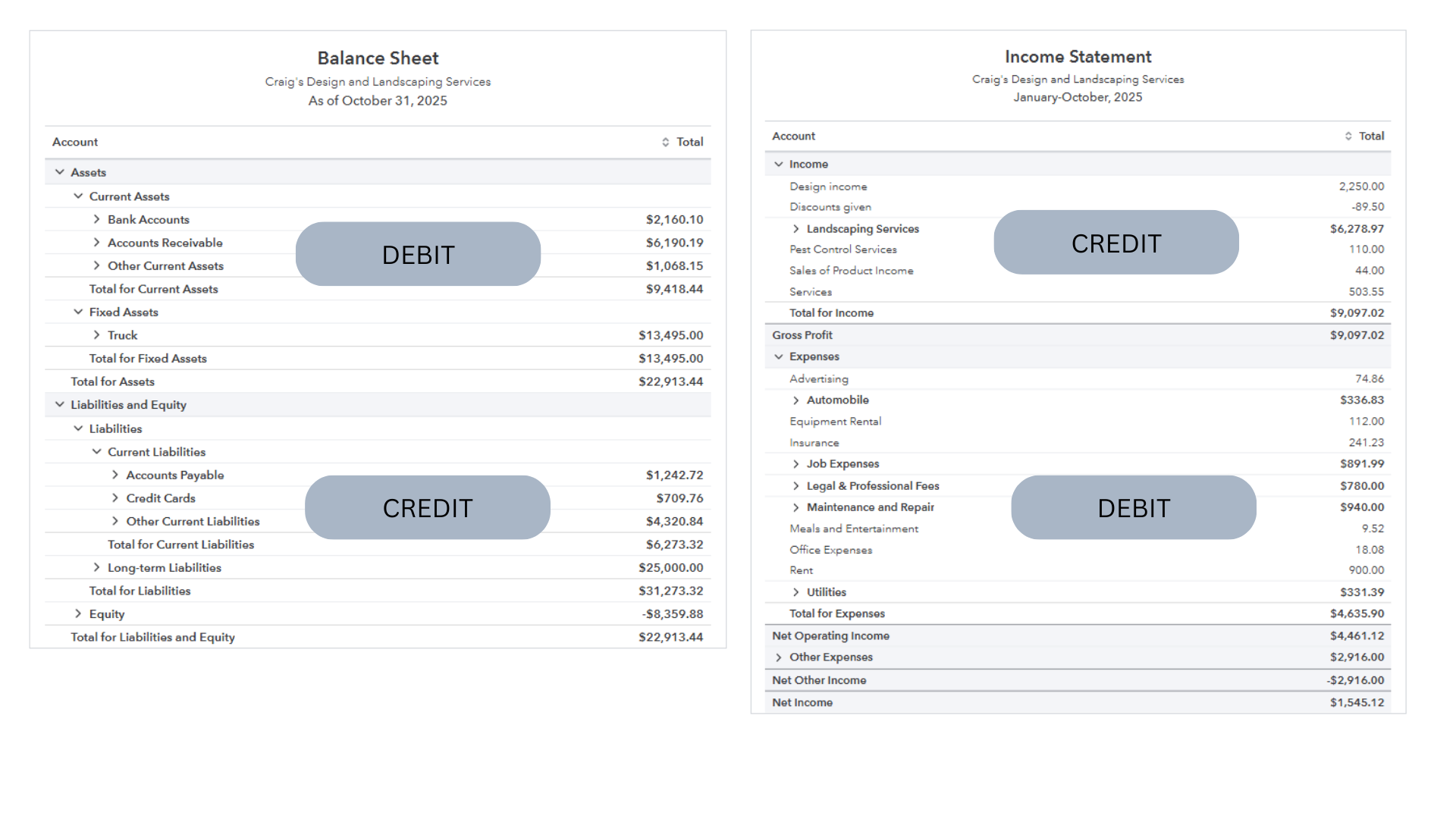
On the Balance Sheet
Assets such as bank accounts, accounts receivable, and equipment are debit accounts. When an asset increases, it is debited. When it decreases, it is credited.
Liabilities and equity are credit accounts. When they increase, they are credited; when they decrease, they are debited.
On the Income Statement
Income accounts carry credit balances, while cost of sales and operating expenses carry debit balances.
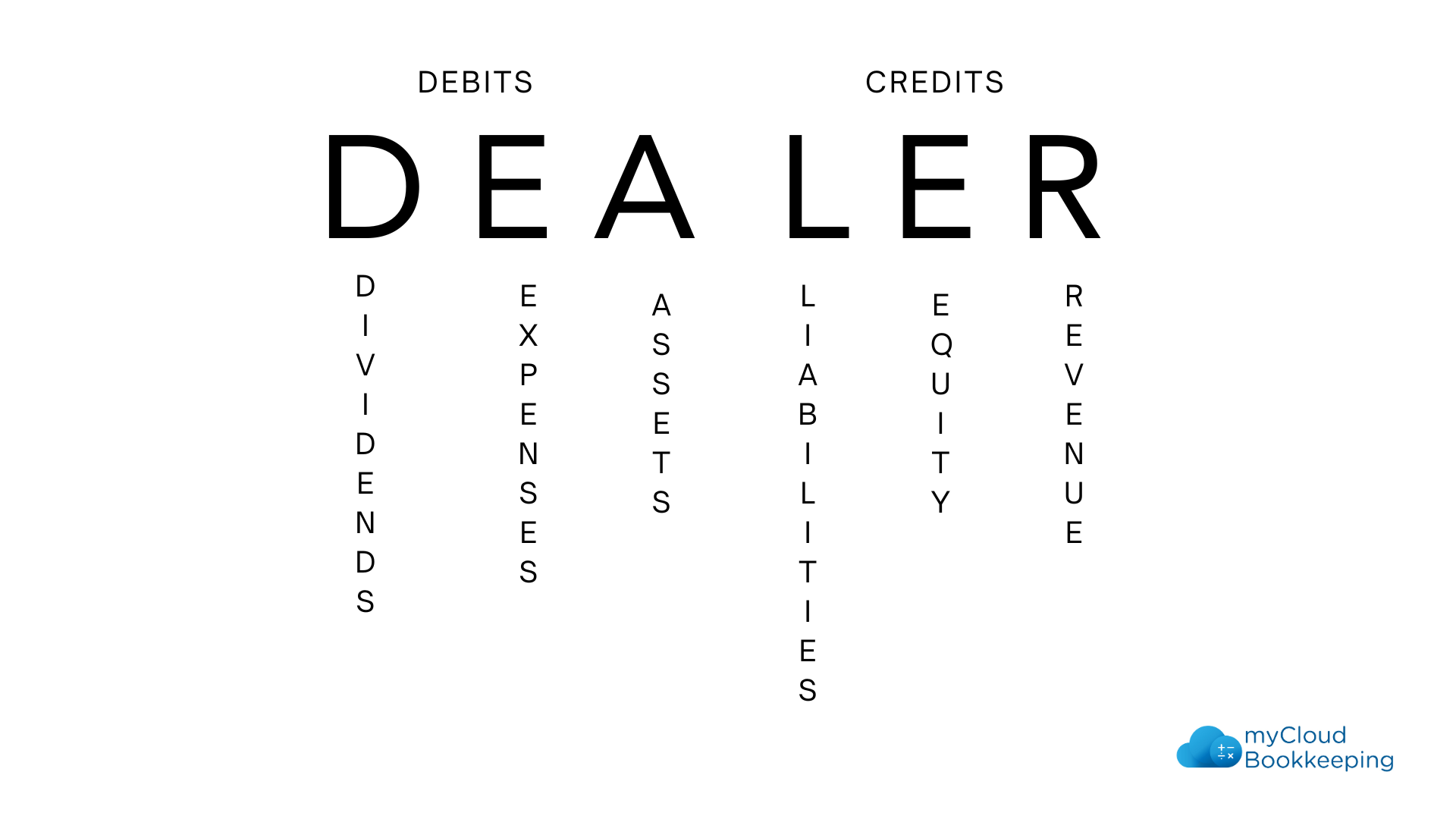
A helpful memory aid is DEALER:
- Debits: Dividends, Expenses, Assets
- Credits: Liabilities, Equity, Revenue
Anytime you want to increase a debit account, you debit it. To increase a credit account, you credit it. Reductions work in the opposite direction.
Common Journal Entry Examples
Seeing examples makes journal entries easier to understand:
- Depreciation: Debit depreciation expense, credit accumulated depreciation
- Accrued expense: Debit expense, credit accrued expenses
- Prepaid insurance: Debit prepaid expenses, credit insurance expense
- Deferred income: Debit income, credit deferred income
- Doubtful debts: Debit doubtful debt expense, credit provision for doubtful debts
- Dividends: Debit dividends, credit shareholder advance or retained earnings (as advised)
Each entry affects both the balance sheet and income statement, ensuring the financial picture remains accurate.
When Not to Use Journal Entries
Journal entries should never replace normal bookkeeping workflows in QuickBooks Online.
Do not use journal entries for:
- Bank or credit card transactions
- Invoices or customer payments
- Vendor bills
- Sales tax
These should always be recorded using QuickBooks Online’s built-in tools. Misusing journal entries can lead to errors that are difficult to track and correct later.
Journal entries are powerful but not everyday tools. When used correctly, they allow for accurate adjustments and meaningful financial statements. When used incorrectly, they can undermine the reliability of your books.
If you’re unsure whether a journal entry is appropriate, it’s best to ask before posting it.
Helpful Resources
Watch the full video walkthrough
https://www.youtube.com/watch?v=qan4A_VYu2s?sub_confirmation=1
Compare QuickBooks Online plans
https://www.mycloudbookkeeping.org/quickbooks-plan-comparison
Download the free Month-End Checklist
https://learn.mycloudbookkeeping.org/small-business-month-end-checklist
Book a free consultation
https://www.mycloudbookkeeping.org/consultation
Still need help?
Check this out.
Let's go!Still need help?
Book a session! We can work together to solve your specific QuickBooks Online questions.
Let's go!Hi, Carrie here from My Cloud Bookkeeping. I work with small businesses and entrepreneurs. And if you’ve been following my channel, you’ll know I work mainly in QuickBooks Online and discourage you from using journal entries in your file. As an accountant, there are times where I do need to post a journal entry in QuickBooks Online. I’m going to explore some of the situations in which you may need to post a journal entry, how to create it, and get those debits and credits around the right way.
First, let’s consider some scenarios where you may be entering a journal entry in your QuickBooks Online file. The first is amortization and depreciation. Year-end amortization or depreciation of your asset is an excellent example for most small businesses and entrepreneurs. This information will be provided by your tax accountant and entered with the year-end journals. However, if you have a high value of assets in your business, it may be worthwhile entering the expense each month to keep track of your actual profit and also be able to project your income tax expense and any bonus or loan covenants that are impacted by your net income or net profit after depreciation or amortization.
Secondly, accrued expenses. This is something you record when you know you have expenses coming and have not received your bill or invoice from the supplier yet. You want to be sure to record the costs, but it’s not accounts payable because you don’t have the bill yet.
Our third example is prepaid expenses. A good example of prepaid expenses would be your insurance premium. This is usually paid annually and applies to the entire year. When you receive the bill or pay the premium, you record that cost to prepaid expenses and then apply a monthly expense and reduce the prepaid amount throughout the year. This ensures that you don’t have a large cost in one month and nothing for the other months so you can properly see what your net income is across the year.
The fourth one is deferred income. If you receive payment in full for services not yet delivered, that would be considered deferred income. An excellent example would be if you deliver a SaaS service that’s provided over a full year and paid upfront. A journal entry is a perfect way to allocate that income if you’re not using QuickBooks Online Advanced, which has a revenue recognition feature.
Now doubtful debts. If you have an old amount outstanding from a customer and you don’t want to write it off yet, you’re still hoping you’ll collect it, but you don’t want to include it in your income or profit as there’s a reasonable chance you won’t collect it. By posting a journal entry, you can reduce the amount of accounts receivable on your balance sheet and show an offsetting expense that can be easily reviewed and monitored so that it’s either reversed when the funds are collected or completely written off when there is no chance and you have a bad debt.
Finally, dividends or bonuses declared at year end. Your tax preparer will often declare dividends or bonuses when the final profit number is known. Shareholder loan balances are often cleared to dividends by your accountant. There are legal ramifications to this, so don’t do it without proper advice, but this is another time you would use a journal entry.
Now that we have an idea of the types of transactions that we would do a journal entry for, how do we know what to debit and what to credit? Let’s take a look at a balance sheet in QuickBooks Online as a starting point. We are in QuickBooks Online with both a balance sheet and an income statement open. On the balance sheet, we have money in the bank, accounts receivable, other current assets, fixed assets. All of these items make up the assets section and these are debit accounts. When we’re looking at the assets section, these are all debits.
The total for our assets balances with the total for liabilities and equity below, which tells you that liabilities and equity are credit accounts. Accounts payable, credit cards, and other amounts you owe are examples of credits. You may occasionally see a minus sign in liabilities, which often means the balance actually belongs in assets.
On the income statement, the first section is income, and income accounts carry credit balances. When we sell something, we increase revenue and we also increase cash or accounts receivable. Cost of sales and operating expenses carry debit balances. When we record an expense, we’re taking money out of the bank or increasing what we owe, so expenses are debited.
Anytime you want to increase a debit account such as an asset or expense, you debit it. If you want to increase a credit account such as income or liabilities, you credit it. And when you want to reduce an account, you do the opposite. Some people use the acronym DEALER: Dividends, Expenses and Assets on the debit side, and Liabilities, Equity and Revenue on the credit side. If that helps you remember, use it.
Now let’s take a look at some journal entry examples. The first is depreciation on a truck. We increase depreciation expense, which is a debit, and we reduce the value of the truck on the balance sheet, which is a credit to the accumulated depreciation account.
Next is an accrued expense. Accounting fees are debited to expense and credited to accrued expenses. This ensures the cost is included in the correct period.
The next example is prepaid insurance. We debit prepaid expenses and credit insurance expense. This reduces the expense recorded in the current period and moves part of it into a future period.
Another example is deferred income. We debit income, reducing it, and credit deferred income, increasing the liability until the service is delivered.
We also look at doubtful debts. We debit the doubtful debt expense and credit provision for doubtful debts on the balance sheet. This avoids interfering with accounts receivable directly.
Finally, dividends. We debit dividends and credit shareholder advance or retained earnings depending on what the accountant has advised.
When we review reports, we can see the impact of these journal entries. In the accounts receivable report, we see the old amount that prompted the doubtful debt entry. In the income statement, we see the full 52 weeks of service that has not yet been earned, which is why we deferred part of the revenue. In the balance sheet, we see prepaid expenses, the provision for doubtful accounts and the depreciation adjustments flowing through. The income statement also shows changes to accounting fees, doubtful debts, depreciation and insurance expense.
Journal entries should never be used for bank accounts or sales tax, and they should not replace regular bookkeeping workflows. If you make a mistake, it can usually be corrected, but journal entries should not be part of day-to-day bookkeeping unless you understand when and how to use them correctly.
I hope this helps and I’ll see you in my next video. Cheers.
Hi, Carrie here from My Cloud Bookkeeping. I work with small businesses and entrepreneurs. And if you’ve been following my channel, you’ll know I work mainly in QuickBooks Online and discourage you from using journal entries in your file. As an accountant, there are times where I do need to post a journal entry in QuickBooks Online. I’m going to explore some of the situations in which you may need to post a journal entry, how to create it, and get those debits and credits around the right way.
First, let’s consider some scenarios where you may be entering a journal entry in your QuickBooks Online file. The first is amortization and depreciation. Year-end amortization or depreciation of your asset is an excellent example for most small businesses and entrepreneurs. This information will be provided by your tax accountant and entered with the year-end journals. However, if you have a high value of assets in your business, it may be worthwhile entering the expense each month to keep track of your actual profit and also be able to project your income tax expense and any bonus or loan covenants that are impacted by your net income or net profit after depreciation or amortization.
Secondly, accrued expenses. This is something you record when you know you have expenses coming and have not received your bill or invoice from the supplier yet. You want to be sure to record the costs, but it’s not accounts payable because you don’t have the bill yet.
Our third example is prepaid expenses. A good example of prepaid expenses would be your insurance premium. This is usually paid annually and applies to the entire year. When you receive the bill or pay the premium, you record that cost to prepaid expenses and then apply a monthly expense and reduce the prepaid amount throughout the year. This ensures that you don’t have a large cost in one month and nothing for the other months so you can properly see what your net income is across the year.
The fourth one is deferred income. If you receive payment in full for services not yet delivered, that would be considered deferred income. An excellent example would be if you deliver a SaaS service that’s provided over a full year and paid upfront. A journal entry is a perfect way to allocate that income if you’re not using QuickBooks Online Advanced, which has a revenue recognition feature.
Now doubtful debts. If you have an old amount outstanding from a customer and you don’t want to write it off yet, you’re still hoping you’ll collect it, but you don’t want to include it in your income or profit as there’s a reasonable chance you won’t collect it. By posting a journal entry, you can reduce the amount of accounts receivable on your balance sheet and show an offsetting expense that can be easily reviewed and monitored so that it’s either reversed when the funds are collected or completely written off when there is no chance and you have a bad debt.
Finally, dividends or bonuses declared at year end. Your tax preparer will often declare dividends or bonuses when the final profit number is known. Shareholder loan balances are often cleared to dividends by your accountant. There are legal ramifications to this, so don’t do it without proper advice, but this is another time you would use a journal entry.
Now that we have an idea of the types of transactions that we would do a journal entry for, how do we know what to debit and what to credit? Let’s take a look at a balance sheet in QuickBooks Online as a starting point. We are in QuickBooks Online with both a balance sheet and an income statement open. On the balance sheet, we have money in the bank, accounts receivable, other current assets, fixed assets. All of these items make up the assets section and these are debit accounts. When we’re looking at the assets section, these are all debits.
The total for our assets balances with the total for liabilities and equity below, which tells you that liabilities and equity are credit accounts. Accounts payable, credit cards, and other amounts you owe are examples of credits. You may occasionally see a minus sign in liabilities, which often means the balance actually belongs in assets.
On the income statement, the first section is income, and income accounts carry credit balances. When we sell something, we increase revenue and we also increase cash or accounts receivable. Cost of sales and operating expenses carry debit balances. When we record an expense, we’re taking money out of the bank or increasing what we owe, so expenses are debited.
Anytime you want to increase a debit account such as an asset or expense, you debit it. If you want to increase a credit account such as income or liabilities, you credit it. And when you want to reduce an account, you do the opposite. Some people use the acronym DEALER: Dividends, Expenses and Assets on the debit side, and Liabilities, Equity and Revenue on the credit side. If that helps you remember, use it.
Now let’s take a look at some journal entry examples. The first is depreciation on a truck. We increase depreciation expense, which is a debit, and we reduce the value of the truck on the balance sheet, which is a credit to the accumulated depreciation account.
Next is an accrued expense. Accounting fees are debited to expense and credited to accrued expenses. This ensures the cost is included in the correct period.
The next example is prepaid insurance. We debit prepaid expenses and credit insurance expense. This reduces the expense recorded in the current period and moves part of it into a future period.
Another example is deferred income. We debit income, reducing it, and credit deferred income, increasing the liability until the service is delivered.
We also look at doubtful debts. We debit the doubtful debt expense and credit provision for doubtful debts on the balance sheet. This avoids interfering with accounts receivable directly.
Finally, dividends. We debit dividends and credit shareholder advance or retained earnings depending on what the accountant has advised.
When we review reports, we can see the impact of these journal entries. In the accounts receivable report, we see the old amount that prompted the doubtful debt entry. In the income statement, we see the full 52 weeks of service that has not yet been earned, which is why we deferred part of the revenue. In the balance sheet, we see prepaid expenses, the provision for doubtful accounts and the depreciation adjustments flowing through. The income statement also shows changes to accounting fees, doubtful debts, depreciation and insurance expense.
Journal entries should never be used for bank accounts or sales tax, and they should not replace regular bookkeeping workflows. If you make a mistake, it can usually be corrected, but journal entries should not be part of day-to-day bookkeeping unless you understand when and how to use them correctly.
I hope this helps and I’ll see you in my next video. Cheers.
Still need help?
Check this out.
Let's go!Still need help?
We have what you need. Check out our courses and free resources to get more help managing your finances.
Let's go!